How Access Control Works: Simple Steps to Stay Secure
Securing your home with a lock, setting a passcode on your phone, or swiping a keycard to enter a building all illustrate the fundamentals of access control. It's the simple but crucial idea of deciding who can go where and use certain resources, relevant in both physical settings and the digital world.
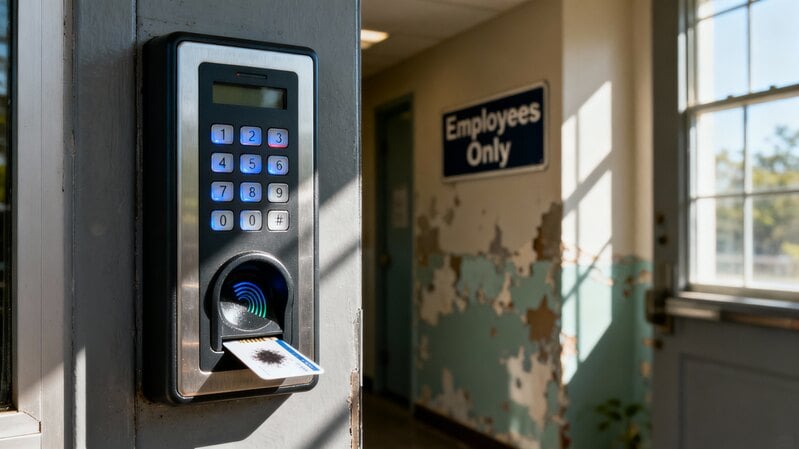
Think of access control as a strict security guard at a club's entrance, checking people before letting them in. This could be a physical location, like your office, or a digital gateway, such as a social media profile. The goal is to allow the right people in while keeping others out.
This concept is vital for protecting our information, spaces, and personal security. Whether it's safeguarding sensitive corporate files or cherished family photos, access control works quietly in the background. We'll explore how this system operates, the different types we encounter regularly, and why it matters in today's world.
The Mechanics of Access Control
So, how do we decide who gets in? Access control generally follows a simple three-step process, similar to getting into an exclusive party.
The initial step is Identification, where you state who you are. At an event, that's like showing your ticket. Online, it's when you enter your username. You're basically announcing, "I'm here!"
Following that comes Authentication, which is all about confirming the identity you've claimed. A security guard might check your ID to match the name on your ticket, whereas online you might type a password or use a fingerprint scan. This stage validates your identity claim.
Last up is Authorization. After you've been identified and authenticated, the system sets what you're allowed to do. A concert ticket might grant entry to the general area but not to the backstage. In the digital world, that could mean having read-only access without edit permissions. It ensures that what you can do matches what's permitted.
Distinguising Physical and Digital Access
Access control isn't just for computers—it applies in both physical and digital spaces. Getting the difference is easy.
Physical access control deals with protecting tangible things. Anything you can lock or secure falls into this category. Its job is to manage movement in the real world. Examples include parking lot gates and hotel key cards. Security guards and locked doors are classic examples of physical access control.
On the other hand, logical access control protects digital assets—anything non-physical like files, software, and websites. It sets up virtual barriers around sensitive data. Logging into an app with a username and password is a form of logical access control. Network firewalls and file permissions are also examples of this.
Varying Access Guidelines
Access control systems vary widely; different situations call for different rules, resulting in diverse access setups. Below are four common models, each with its own distinct approach.
Discretionary Access Control (DAC) lets the owner of a file or folder decide who gets access. It's like owning a car—you hold the keys and choose who can drive.
Mandatory Access Control (MAC) is the strictest model, where a central authority sets access rules that individuals cannot change. Often found in high-security environments like military facilities, access depends on clearance levels rather than personal choice, similar to classified documents.
Role-Based Access Control (RBAC) is popular in companies, granting access based on specific job roles. For example, a cashier might have access to certain systems that others don't. This approach makes managing access easier for large organizations.
Attribute-Based Access Control (ABAC) assigns access dynamically based on various attributes—such as user role, location, time, and data type. It's like a streaming service that restricts a child's profile to age-appropriate content.
Everyday Access Control Examples
Every day you come into contact with numerous access control systems, frequently without being aware of it. Once you notice them, their existence becomes obvious.
For instance, you might unlock your phone with a face or fingerprint scan, which is biometric access, or type in a password to get into your email, which is logical access based on something you know.
Swipping a keycard to enter a hotel room or tapping an employee badge at the office are examples of physical access tokens. Setting up parental controls on a device uses role-based or attribute-based access to limit what content is available.
The Importance of Robust Access Control
For companies large or small, access control isn't just useful—it's essential, acting as a key building block of modern security for smooth day-to-day operations.
One major benefit is fewer data breaches. Strong access control shields sensitive details like financial records from those who shouldn't see them, lowering the chance of a breach.
Additionally, it supports regulatory compliance. Many industries are subject to strict data protection requirements. For example, HIPAA in healthcare and GDPR in Europe mandate the protection of personal information. Access control plays a key role in meeting these regulations and avoiding fines.
It also addresses insider threats. Not every risk originates from outside. Access control limits employees to only the data they need, following the 'least privilege' concept, which reduces the impact of compromised accounts or human error.
Enhancing Security with Multi-Factor Authentication
Even though passwords are widely used, they can be stolen. Multi-Factor Authentication (MFA) adds a simple yet effective extra layer of security, making accounts more secure.
MFA demands several identity checks from different categories: something you know (passwords/PINs), something you have (smartphones/USB keys), and something you are (biometrics like fingerprints). It's like needing both a key and a code to open a vault. If a key (password) is stolen, the code still blocks entry. Using multiple factors greatly boosts security and gives users more confidence.
Navigating Safety Amidst Digital Entryways
The shift from traditional locks to biometric systems shows how access control serves as a daily safeguard for spaces, assets, and digital privacy.
At its core, access control involves declaring and verifying who you are before allowing entry. Whether it's a physical key or an advanced system that checks roles, the goal stays the same: keeping things safe.
Grasping how digital security works is key to staying safer both online and in the real world. Knowing these basics helps you make smarter choices about your own security and recognize the behind-the-scenes work that protects our surroundings.