How Access Control Works: Simple Steps to Stay Secure
Have you ever locked your front door, punched a PIN into your phone, or swiped a badge to enter a building? Each of those routine actions is a basic example of access control at work.
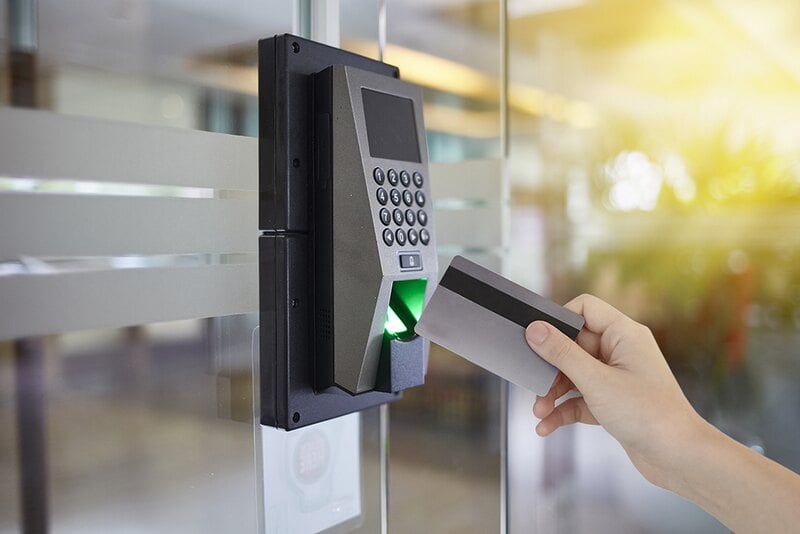
Access control is simply a structured method for determining who can go where, use what, and view which information. It covers physical spaces, such as homes and offices, as well as digital spaces like your email, social media, and work accounts. The same core idea shows up everywhere: some doors are open to anyone, while others require proof that you're supposed to be there.
You can think of access control as a polite but firm gatekeeper standing by a door. The gatekeeper verifies who you are before letting you through. That door might lead to a server room, an online banking portal, or a messaging app. The objective never changes: let the right people in and keep everyone else out.
How access control actually works
Behind the scenes, most access control systems follow a straightforward pattern. It's similar to checking in at an event where only invited guests are admitted. The steps are clear on their own but become powerful when combined.
The first step is Identification. This is where you state who you are. Giving your name at a venue's check-in desk is one example. On a website, it's when you enter your username or email. At this point, you're simply declaring, "This is my identity."
The second step is Authentication. Now you need to prove that the identity you claimed actually belongs to you. In the physical world, that might mean showing an ID card or a ticket that matches your name. Online, this could involve entering a password, scanning your fingerprint, or using face recognition. Authentication supplies the evidence that backs up your claim.
The final step is Authorization. Once the system accepts that you are who you say you are, it determines what you're allowed to do. At a concert hall, your ticket might grant access to general seating but not the VIP lounge. In a company system, your account might let you view certain files but not modify them. Authorization ensures you can only reach the parts of a system that align with your permissions.
Access control in the physical and digital worlds
Access control operates both in the tangible world and in the realm of data and networks. Understanding the distinction between these two areas makes the concept much easier to grasp.
Physical access control focuses on protecting real-world spaces and objects. Door locks, security guards at a gate, and subway turnstiles are all examples. Key cards, metal keys, and entry codes fall into this category. The aim is to manage who can move around in the physical world and to keep unauthorized individuals out of restricted areas.
Logical access control, on the other hand, centers on digital resources. It safeguards things you can't hold in your hands, like files on a server, cloud applications, or online accounts. Passwords, permissions, and encryption are tools of logical access control. Every time you sign in to a service or approve a login request, you're engaging with logical safeguards that keep your information out of the wrong hands.
The main models that define who gets in
Not every access control system relies on the same set of rules. Different environments use different decision models, depending on how flexible or strict they need to be. Four models are especially common and underpin many security setups.
Discretionary Access Control (DAC) is the most flexible. In this model, the owner of a resource chooses who can access it. If you create a document and decide which colleagues can open, edit, or share it, you're using DAC. It's like owning a car and deciding who gets to borrow the keys.
Mandatory Access Control (MAC) sits at the opposite end of the spectrum. A central authority sets the rules, and individual users can't override them. This approach is common in high-security environments, such as government agencies or the military. Access is based on clear classification levels and clearances, not personal preferences.
Role-Based Access Control (RBAC) assigns permissions according to job roles. Instead of granting each person separate rights, you define roles like "manager," "support agent," or "accountant." When someone joins the company or changes positions, they receive the permissions tied to their role. This simplifies access management for large teams and cuts down on errors.
Attribute-Based Access Control (ABAC) is more dynamic. It examines multiple attributes to decide whether to grant access. These might include the user's role, location, time of day, device, and the sensitivity of the resource. For example, a system might allow a manager to open a document only when they're using a company laptop during work hours. ABAC enables highly detailed, context-aware decisions.
Everyday examples of access control around you
Even if you've never heard the term "access control" before, you probably interact with dozens of such systems daily. Once you start noticing them, you'll see how much they shape your routine and keep things running safely.
When you unlock your smartphone with your fingerprint or face, you're using biometric authentication to gain logical access to your apps and data. The phone checks something you are before letting you in.
Typing a password to open your email inbox relies on knowledge-based access control. You prove your identity by entering a secret only you should know, keeping your messages protected from others. Using a key card to enter a hotel room or an office is an example of a physical access token. The card is something you have, and the door only opens if it recognizes the token as valid for that room or area.
Employee badges that open certain doors but not others are another physical example. The badge tells the system who you are and which zones you're allowed to enter, keeping restricted spaces secure. Setting parental controls on a streaming service or tablet limits what children can see or do. In many cases, this is a mix of role-based and attribute-based access control, using age or profile type to decide which content is allowed.
Why controlling access matters so much
For organizations, access control isn't just a technical detail; it's a cornerstone of security. Without clear rules about who can see and change information, data can easily be exposed, lost, or misused.
Strong access control is one of the best defenses against data breaches. By limiting who can view sensitive records, customer details, or strategic plans, companies reduce the chances that attackers will succeed, even if they compromise a single account or system.
Many industries are also legally required to protect personal and confidential information. Regulations in healthcare, finance, and other sectors mandate strict safeguards. Access control helps organizations meet these obligations, avoid heavy penalties, and demonstrate that they take privacy seriously.
Internal threats are another important reason. Not every risk comes from outside attackers. Sometimes mistakes, curiosity, or deliberate misuse by insiders can cause harm. By giving employees only the access they need to do their jobs—a principle called least privilege—organizations limit the potential damage from human error or malicious actions.
Going beyond passwords with extra layers of proof
Despite being everywhere, passwords alone are no longer enough to keep accounts safe. They can be stolen, guessed, or reused across multiple sites. To address this weakness, many services now use Multi-Factor Authentication, often shortened to MFA.
MFA adds at least one more checkpoint to the login process. Instead of relying on a single password, it asks for two or more separate factors. These factors usually fall into a few simple categories that are easy to remember.
Something you know is one category, such as a password or a PIN code. This is information stored in your memory that you provide when asked. Something you have is another factor, like a smartphone that receives a verification code, a hardware security key, or a smart card. Even if someone discovers your password, they won't have your device. Something you are refers to biometric traits, such as your fingerprint, face, or voice. These features are much harder for someone else to copy, adding a powerful layer of protection on top of your other factors.
Staying secure in a world full of digital gates
From the sturdy lock on your front door to the login screen on your banking app, access control quietly shapes your daily life. It acts as a hidden guardian, ensuring that only the right people can reach certain spaces, systems, and information.
At its core, the process is straightforward: you declare who you are, you prove it, and then you receive only the access you need. Whether you use a simple key or a complex combination of passwords, tokens, and biometrics, the goal is always to support a safe and orderly environment.
By understanding how these digital and physical gatekeepers work, you can make smarter decisions about your own security. Choosing strong authentication options, using multiple factors when available, and being mindful of where and how you log in are all practical steps. With a bit of awareness, you can take advantage of the convenience of modern systems while still keeping your world well protected.
Common mistakes people make with access control
Even strong security systems can be weakened by simple human mistakes. One of the most common issues is sharing passwords or leaving them written down where others can see them. This makes secure systems vulnerable, no matter how advanced they are. Access control works best when each user keeps their credentials private and updated.
Another frequent issue is granting too much access to too many people. When employees have permissions they don't actually need, it increases the risk of accidental or intentional misuse. Properly managing what each person can access helps keep information safe and reduces the potential for errors or data loss.
Outdated accounts also create hidden risks. Old logins, former employees, and unused permissions can all become entry points for attackers. Regularly reviewing and removing unnecessary accounts ensures that only active, authorized users can get in, making the overall system stronger and cleaner.
Building better habits for stronger security
Good access control doesn't rely on technology alone—it also depends on people following smart habits. Using unique passwords for different accounts, enabling multi-factor authentication when possible, and locking your devices when you step away are simple behaviors that greatly improve everyday security.
Training and awareness also play a major role. When individuals understand how access control works and why it matters, they are more likely to recognize suspicious activity or misuse. A team that knows what to watch for becomes an additional layer of protection for any organization.
Lastly, reviewing your own settings from time to time helps ensure everything is configured the way you expect. Whether it's checking app permissions on your phone or adjusting who can see your online documents, small updates can prevent bigger problems later. These habits make access control more effective and keep your digital life safer.