Beginner Graphic Design Courses to Create Your Own VTuber Avatar
Have you ever dreamed of creating a VTuber avatar that fits your personality? As virtual creators become more popular, graphic design skills are increasingly in demand. Designing your own VTuber model isn't just for pros anymore—beginner-friendly courses and tools make it accessible to everyone. If you're hoping to break into the VTuber space, learning graphic design is an ideal first step.
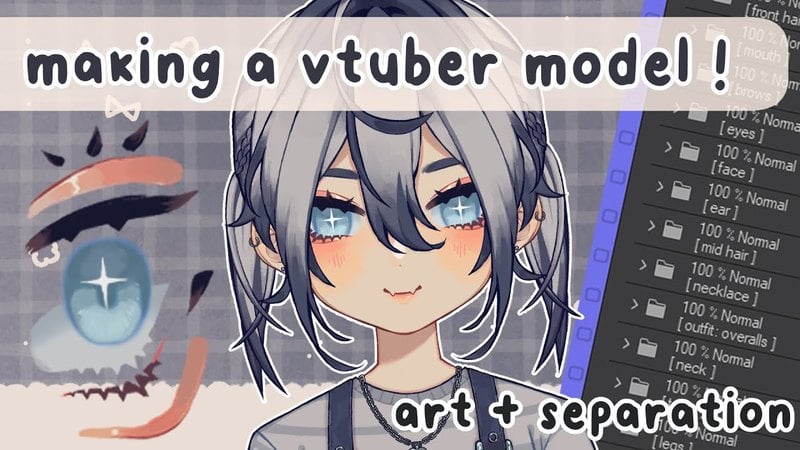
Graphic design is the core of VTuber creation: it helps you master color balance, proportions, and visual storytelling. Whether you want a 2D Live2D model or a 3D character, knowing design principles lets you take full control over your avatar's appearance and personality. In this article, we'll cover beginner-friendly graphic design courses, the essential tools you'll need, and advice for making your first VTuber avatar stand out.
1. Why Graphic Design Is Important for VTuber Creation
Graphic design is about more than looking good—it's about communication. In the VTuber scene, your avatar is your identity. A thoughtfully designed character grabs attention, expresses your personality, and helps viewers form a deeper connection with you. By picking up basic design concepts like color theory, symmetry, and visual hierarchy, you can create a character that comes across as polished and expressive.
Your color palette, for instance, can shape how people perceive your avatar. Bright hues suggest energy and friendliness, while cooler tones imply calmness or mystery. Graphic design training shows you how to use these choices deliberately to boost your character's appeal.
Even if you plan to work with an artist later, knowing design fundamentals helps you communicate your ideas clearly and ensures your final VTuber avatar turns out exactly as you imagined.
2. Best Beginner Graphic Design Courses
There are plenty of online platforms with beginner-friendly graphic design courses geared toward creative projects such as VTuber avatars. Sites like Skillshare, Coursera, and Udemy offer structured lessons that cover the essentials of Photoshop, Illustrator, and digital drawing tools. These courses are affordable, flexible, and available from anywhere.
For true beginners, courses like "Introduction to Graphic Design" or "Digital Illustration for Beginners" are excellent entry points. They focus on design principles, using layers, and producing clean, attractive visuals. As you go further, specialized classes in character design or Live2D rigging can help you animate your VTuber.
Many creators also suggest YouTube tutorials for quick advice on avatar design, line art, and shading. The best approach is combining structured learning with hands-on practice to build both skill and creativity.
3. Essential Tools for VTuber Design
Selecting the right design tools makes the creative process simpler and more fun. For 2D designs, programs like Adobe Photoshop, Clip Studio Paint, or Krita give you everything needed to draw and polish your avatar. These tools let you layer facial features, outfits, and accessories with precision.
If 3D VTuber models interest you, Blender and Vroid Studio are two popular free options. Blender provides complete 3D modeling tools for advanced users, while Vroid Studio makes character creation easier through built-in templates and customization options. Both work well depending on your experience level.
Additionally, a drawing tablet such as a Wacom or Huion can boost your control and accuracy when creating detailed illustrations. With the right setup, you can turn your ideas into refined, professional-quality designs.
4. Step-by-Step Approach to Designing Your VTuber Avatar
Designing your VTuber avatar involves a series of steps, from initial concept to final rendering. Start by defining your character's personality and purpose—are they cheerful, mysterious, or bold? Those traits will guide choices about expressions, color schemes, and clothing styles.
Next, sketch several concepts to explore different directions. Once you settle on a base design, move to digital illustration and focus on proportions and details. Beginners can simplify this stage by using character templates or pose references found online.
Finally, export your finished avatar in the format your platform requires, whether it's a PNG for streaming overlays or a rig-ready file for Live2D or 3D animation software. Following this step-by-step process keeps you organized and helps you get professional results even as a beginner.
5. Tips for Creating a Unique VTuber Avatar
To stand out in the VTuber community, you need a character that feels authentic and memorable. Steer clear of copying existing designs—draw inspiration from your own personality or interests instead. Use distinctive hairstyles, accessories, or signature colors to give your character a unique identity.
Consistency matters too. Make sure your avatar's design fits your content style and theme. A gaming-focused VTuber, for example, might use bold colors and futuristic outfits, while an educational channel may prefer a clean, approachable look.
Finally, keep your design flexible. As your brand grows, you'll likely want to update or adjust your avatar, so build in adaptable elements that can evolve over time without losing your identity.
6. Common Mistakes Beginners Should Avoid
Many first-time VTuber creators rush the design phase, which leads to avatars that feel generic or inconsistent. One common mistake is using too many colors or unnecessary details that distract from the character's expression. Simplicity often creates stronger, more appealing designs.
Ignoring proportions or perspective is another pitfall. Even stylized characters need balanced anatomy to look natural. Beginners should also avoid skipping the sketching stage—rough drafts help refine ideas before you commit to final artwork.
Finally, poor file organization and messy layer management can cause problems later, especially during rigging or animation. Staying organized keeps production smoother and leads to higher-quality results.
7. Bringing Your VTuber Avatar to Life
After your design is done, it's time to bring your VTuber to life with motion and expression. Platforms like Live2D Cubism or VSeeFace let you animate facial expressions, lip movement, and gestures. For 3D, Unity or VUP can connect your avatar to real-time motion tracking software.
Try out different poses and backgrounds to showcase your character's personality. Even small touches—like blinking or smiling—can make your avatar feel more human and engaging. Over time, you'll get better at fine-tuning animations and transitions for professional-level streams.
Creating a VTuber avatar is a rewarding journey that blends art, technology, and imagination. With the right courses, tools, and dedication, you can design a character that truly represents you in the virtual world—and delight audiences everywhere.