Drive Your Vision: Building Custom Cars with Car Design Software
Have you ever dreamed of designing your own custom car from the ground up? These days, car design software allows both hobbyists and professionals to turn that idea into reality — directly on a computer screen. Rather than relying only on sketches and guesswork, you can model, adjust, and preview your vehicle digitally.
1. Why Use Car Design Software for Custom Vehicles
In the past, custom car building depended heavily on physical models, clay maquettes, or paper schematics. When mistakes showed up late, the fix was expensive. With car design software, many of those issues can be caught early.
These tools let you test proportions, surface curvature, and configurations virtually. You can experiment with wheelbases, body lines, and exterior details in real time before metal ever meets machine.
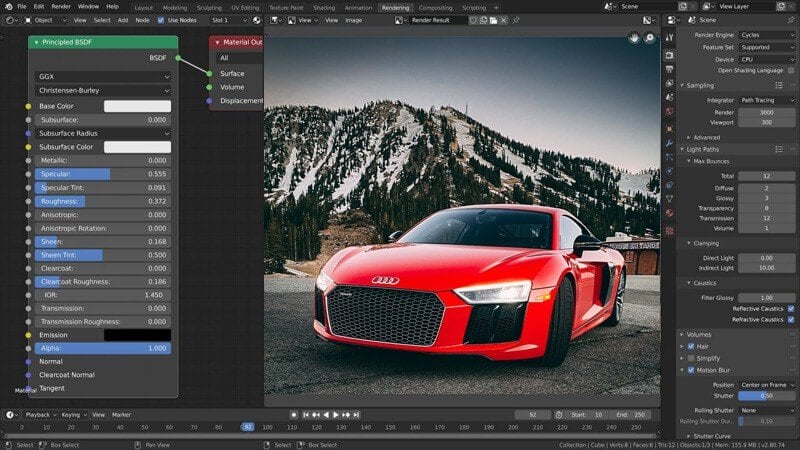
Additionally, modern software includes simulation and rendering, so you can see how the car looks under different lighting, colors, or materials. You get a realistic preview long before fabrication starts.
2. Core Components of Car Design Software
At its core, car design software brings together 3D modeling, surface control, and visualization. Designers use these modules to shape, refine, and present their concept vehicles.
Surface control tools—such as NURBS, splines, and patch modeling—help create smooth, flowing bodywork. You can adjust curves and edges with accuracy to match aerodynamic or aesthetic goals.
Rendering engines and material editors allow you to preview paint finishes, reflections, textures, and lighting. That visual realism helps you settle on color schemes, trim styles, and accessory placement before manufacturing begins.
3. Key Software Tools You Can Try
Several popular design platforms support custom car modeling and automotive design workflows.
Autodesk Alias is widely used in automotive studios for class-A surface modeling and industrial design.
Blender, with its free and open-source workflow, offers polygonal sculpting, modifiers, and powerful rendering—ideal for concept work or indie projects.
Other tools like SolidWorks, CATIA, and Creo excel at parametric design—useful when engineering constraints, mechanical parts, or structural integrity matter.
Choosing the right software depends on what matters most to you: stylistic freedom, engineering precision, or visual presentation. Many designers actually use several tools in a single pipeline.
4. Steps to Design Your Custom Car Digitally
Here's a simplified workflow you can follow to build your own car using design software:
-
Reference and concept sketching
Collect photos, sketches, and dimensions. Define the style, proportions, and unique features you want. -
Base 3D modeling
Use 3D design tools to create a basic chassis and body shell. Begin with rough shapes, then refine curves and surfaces step by step. -
Detailing and component integration
Add wheels, lights, trim lines, grilles, mirrors, and aerodynamic parts. Use surface tools to blend them smoothly into the body. -
Material and rendering pass
Assign paint finishes, materials, and textures. Render the car in different environments to observe how it reacts to light. -
Iteration and feedback
Share your renders or VR views for critique. Incorporate changes and keep refining the design until you're happy with it.
With this iterative approach, you can avoid costly mistakes and gradually move toward a polished vehicle concept.
5. Benefits of Custom Car Design Software
One major advantage is visual clarity. Instead of trying to interpret flat sketches, you see your car in 3D, from every angle, with lighting and reflections.
You also gain flexibility and speed. Want to change the body width or test a different wheel design? It's far easier and faster to adjust digital models than to rebuild physical parts.
Another key benefit is communication and collaboration. Rendered views, turntables, or VR files make it simpler to share your ideas with manufacturers, 3D printers, or workshop partners.
6. Challenges You May Face
Digital car design isn't without its difficulties. The complexity of surfaces, edge continuity, and smooth transitions demands a high level of precision.
High-performance rendering can be resource-intensive. Without solid hardware, getting realistic images might take a good deal of time.
In addition, turning your digital model into an actual drivable car requires mechanical, structural, and fabrication expertise—not everything that works in simulation transfers cleanly to the real world.
7. Advanced Techniques and Future Trends
In recent years, generative design and AI have begun to shape car design. You can use algorithms to automatically explore many design variations based on performance constraints.
Real-time engines like Unreal or Unity are being integrated to deliver interactive car previews, lighting changes, or animation in VR environments. Adobe's Substance 3D toolset also fits into car design pipelines for realistic texturing.
Another trend is cloud-based configurators such as L-DRIVE, which let users customize and see their car in real time in showrooms or online.
Conclusion
Custom car building used to be limited to master fabricators working with clay and metal—but now design software brings it within reach for creative enthusiasts and professionals alike.
By using 3D modeling, surface tools, and realistic rendering, you can visualize unique vehicles long before metal is cut. While challenges remain—especially in turning digital designs into real cars—the path forward is both exciting and accessible.
If you've ever dreamed of building a ride that's uniquely yours, start practicing with your chosen software. Sketch, model, iterate—and bring your vision into digital reality.